
Setting Up Cloud Service
Each Air Lite must be bootstrapped with an LwM2M server before it starts reporting data. In the standard configuration, this is the Sensorbee Cloud.
Find the pairing code
The pairing information is printed on a sticker on the back of the unit:
- ·An eight-digit pairing ID.
- ·A QR code linking to the pairing page, which pre-fills the pairing ID.
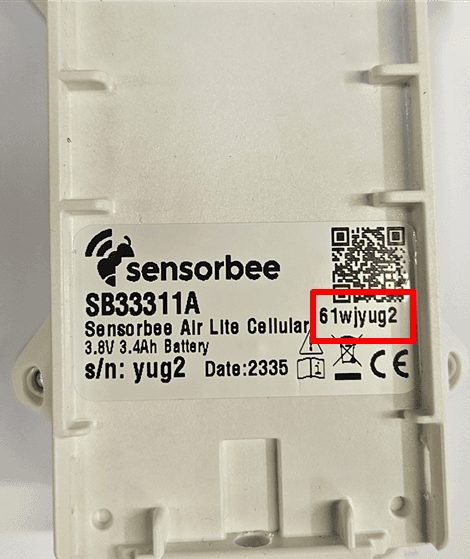
If the outer sticker is damaged, a second copy of the pairing ID is printed on a sticker inside the unit.
Pair the unit
Scan the QR code with any smartphone, or enter the eight-digit pairing ID manually on the pairing page. The unit needs to be powered on and to have completed its initial network registration (blinking purple LED) before the pairing handshake can complete.
For the end-to-end account setup walk-through, see Sensorbee Air Pairing Process.
Once pairing completes, the status LED goes solid purple, flashes solid green for one second, and then turns off. The unit is now online.
To learn more about what you can do with the unit once it's connected, see Sensorbee Cloud Services.