
Cellular Signal Strength Guidelines
A Sensorbee Air unit only delivers data as reliably as its cellular link allows. This page explains how to read the signal-strength value in the Sensorbee Cloud, what the thresholds mean, and what to do about a weak signal.
A brief outage does not mean lost data. Sensorbee Air units buffer up to a week of measurements locally. When the unit reconnects, the buffered readings are automatically back-filled into the cloud in chronological order, so brief coverage drops or roaming switches don't leave gaps.
Receiver sensitivity
The Sensorbee Air series has defined sensitivity thresholds for each supported cellular protocol (LTE-M and NB-IoT). The values below are the typical maximum receiver sensitivity (RSRP) — the weakest signal the unit can reliably connect on:
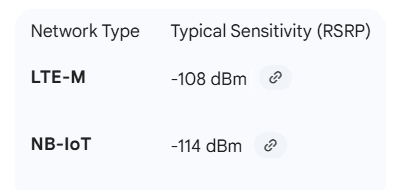
If the unit's reported RSRP is within a few dB of this floor, treat the link as marginal and consider repositioning or switching protocols.
What RSRP means
The signal strength value shown in the Sensorbee Cloud is RSRP (Reference Signal Received Power):
- ·Definition — the average received power of the cell's reference signals.
- ·Purpose — used by the unit and the base station to assess link quality and trigger handovers.
- ·Unit — dBm (decibels referenced to 1 milliwatt).
- ·Scale — logarithmic: a 3 dB increase doubles the received power, a 10 dB increase multiplies it by ten. Small-looking differences matter.
Interpreting the reported value
Use this table as a quick guide when looking at a unit's RSRP in the cloud:
| RSRP (dBm) | Quality | Action |
|---|---|---|
| ≥ −85 | Excellent | No action needed. |
| −85 to −95 | Good | Monitor; no action expected. |
| −95 to −105 | Fair | Data should still flow; worth improving if possible. |
| −105 to −115 | Poor | Expect intermittent drops. Reposition the unit or consider a higher-gain antenna. |
| < −115 | Unusable | Connection will be unstable. Move the unit, change protocol, or switch SIM. |
Product-specific sensitivity thresholds (see the image above) should always be checked first — they take precedence over these general ranges.
Troubleshooting weak signal
- ·Reposition the unit. Move away from buildings, dense foliage, and metal structures. Height usually helps.
- ·Check the antenna. Ensure the antenna is fully mated and not damaged or shielded by mounting brackets.
- ·Try the other protocol. NB-IoT typically penetrates buildings better than LTE-M at the cost of latency. If your data volume allows, switch and retest.
- ·Confirm carrier coverage. Use a phone on the same SIM to verify service is available in the area at all.
These values are guidelines. Real-world performance also depends on RSRQ (signal quality) and SINR (signal-to-interference-plus-noise ratio), which the network reports alongside RSRP.