
Baseline Calibration
Baseline calibration anchors the sensor against a low reference value — usually a period when the target gas concentration is at or near zero. It sets the offset constant, which the firmware applies to subtract residual current.
You'll need reference data uploaded first. See Upload Reference Data.
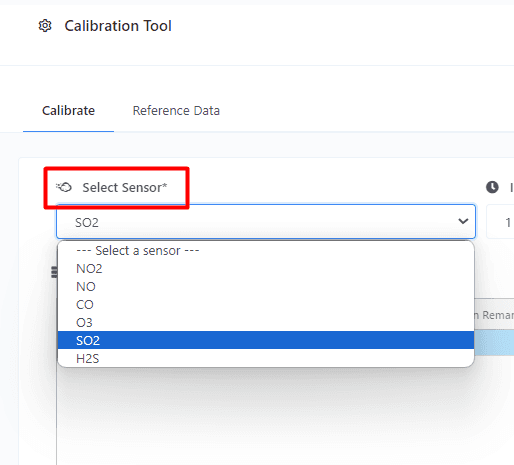
1. Select the sensor
Pick the gas sensor you want to calibrate. Make sure you select the right one — picking the wrong sensor leads to nonsense calibration values.
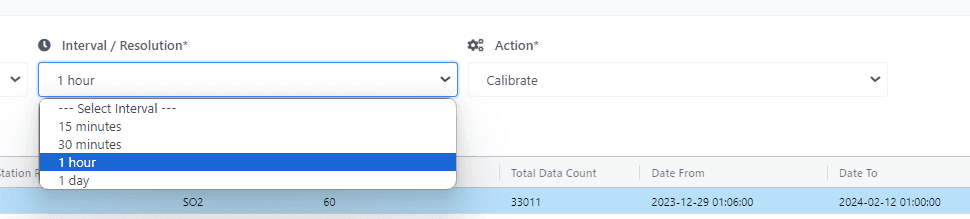
2. Set interval and pick the Calibrate action
Pick the time interval you want to work at, and choose Calibrate as the action.
3. Select reference data
Pick the reference dataset for the target gas. The accuracy of the calibration depends on the reference data being correct for the gas you're calibrating.
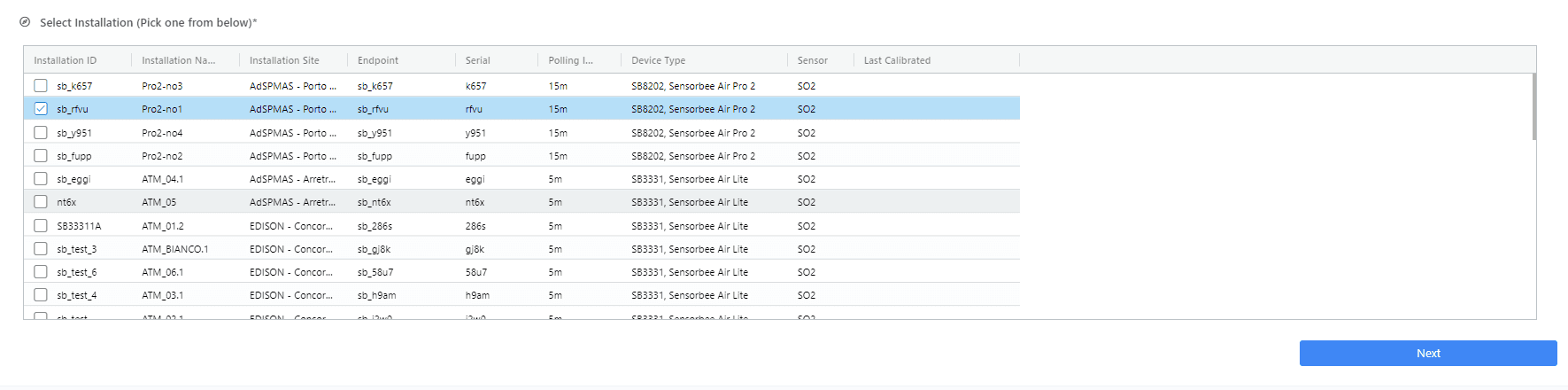
4. Select the installation
Pick the installation the sensor belongs to — environmental conditions at the installation site affect the readings, so the calibration is scoped per-installation.
5. Apply
For span calibration (using a high reference concentration alongside this baseline), continue to R² Correlation → Calibrate. For just the baseline, applying it here is enough.