
Status LED
The status LED is on the outside of the unit's base — on the connector panel of the Air Pro 2, and on the top-right corner of the base on the Air Lite. It shows what the unit is doing and surfaces any error conditions.
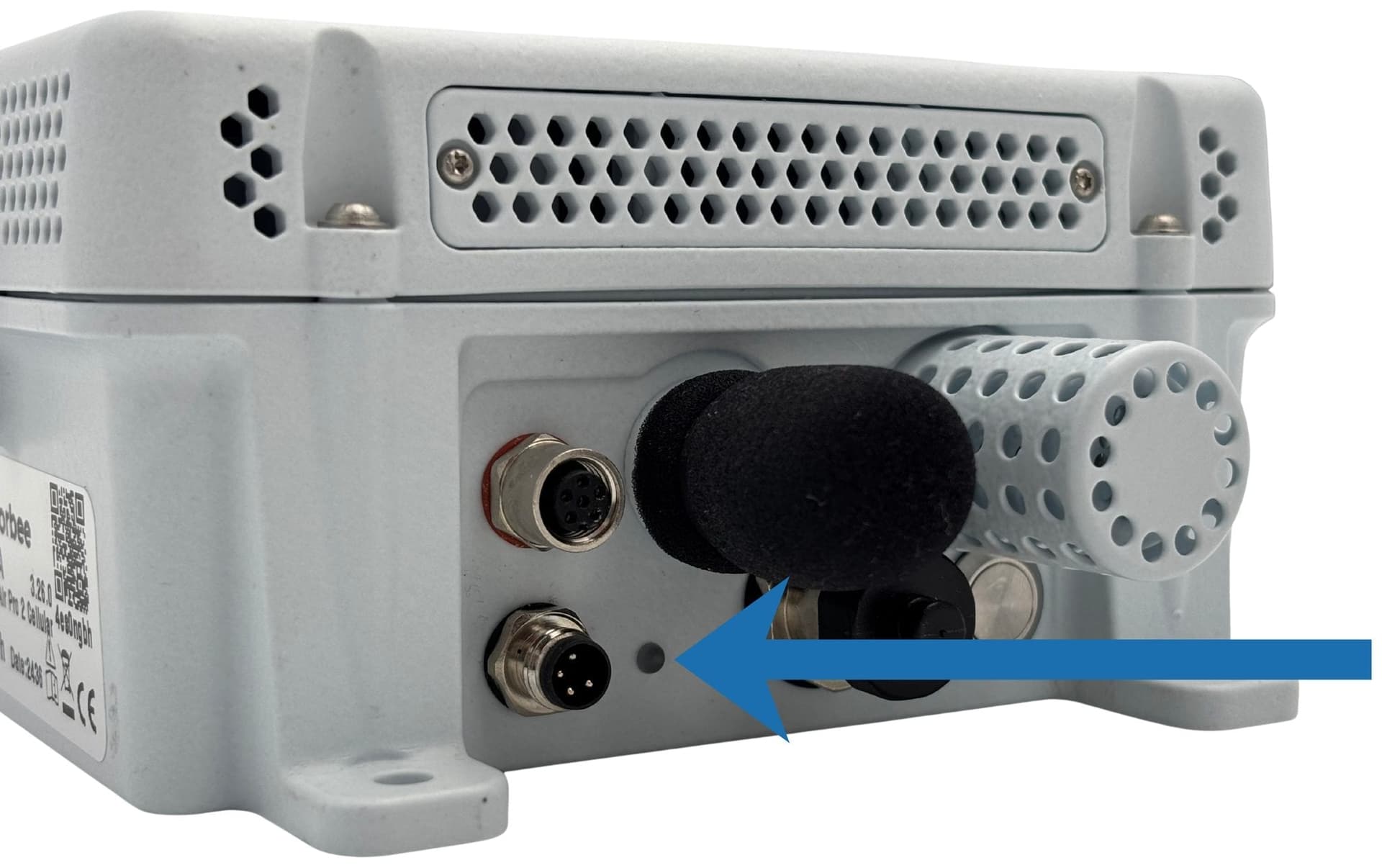
Normal operation
| Colour | State | Meaning |
|---|---|---|
| Green | Solid | Booting — shown briefly between power-on and the first network attempt. |
| Blue | Solid | Connecting to the cellular network. The LED turns off once connected. |
| Green | Single blink | Successfully registered with the LwM2M server. |
| Green | 5 quick blinks | The unit is rebooting. |
| Green | 3 quick blinks | Alive check — the unit is powered on and running. Shown in response to a short press (under 4 seconds) of the power button. |
| Purple | Blink | Connecting to the bootstrap server. |
| Purple | Solid | Bootstrap complete — the unit is now connecting to its long-term LwM2M server. |
| Red | Solid | Error during boot or while connecting to the server. |
| Red | Blink every 10 s | Deep sleep — waiting for the battery to recharge above the threshold. |
| White (very light blue) | Solid | Menu mode (USB-C connected). The unit will not run normally until the USB cable is removed and the unit is restarted. |
Alive check
Once the unit has registered with the network the LED goes off and stays off, so a deployed unit looks identical whether it is running or not. To confirm a unit is alive without logging into the cloud portal, press and release the power button briefly — a running unit answers with three fast green blinks, then returns the LED to off.
This applies to the Air Pro 2, the only Air unit with a power button. The Air Lite has no power button and cannot be checked this way.
The burst is suppressed whenever the LED is held in a fixed state — in menu mode (USB-C connected), or during a shutdown already under way. No blinks in those conditions does not mean the unit has failed.
Do not hold the button down. Holding it for 4 seconds or more starts a shutdown instead — see Shutdown below.
Shutdown
| Colour | State | Meaning |
|---|---|---|
| Red | Solid | Powering down. The LED turns off once shutdown is complete. |
| Green | Blink | Shutdown failed — usually because external power is still connected to the unit. |
Firmware update (menu mode)
| Colour | State | Meaning |
|---|---|---|
| Light blue | Blink | New firmware is being received over XMODEM. |
| Light blue | Solid | XMODEM transfer complete. The unit reboots after about 10 seconds to finalise the update. |
For interpreting cellular signal strength specifically, see Cellular signal strength guidelines.